The W9RCA Repeater
The RCA Amateur Radio Club operates an open repeater on 146.28/88 MHz. The repeater is a Yaesu DR-1X C4FM digital / conventional FM repeater. The transmitter and main receiver is located on the west side of Indianapolis near 10th St. and I-465 with an antenna height approximately 200 ft. above average terrain. The repeater is also an EchoLink node (6522).
CONVENTIONAL ANALOG FM ACCESS REQUIRES A CTCSS SUBAUDIBLE TONE OF 88.5 Hz encoded on your transmitter. Analog FM users will also want to use 88.5 Hz tone squelch receive on their radios to keep from hearing the digital signals which sound like white noise. The repeater timeout is approximately 3 min. The repeater hang time is approximately 5 seconds. There is no reason to wait until the repeater drops to begin your next transmission. The timer is reset at the beep approximately 0.25 seconds after the user quits transmitting.
YAESU SYSTEM FUSION C4FM DIGITAL IS ALSO SUPPORTED. Digital users be aware that the repeater will not change modes while the transmitter is up. Digital users must wait, following an analog transmission, until the repeater transmitter drops, approximately 5 seconds before beginning a digital transmission. There is no hang time following a digital transmission. The repeater timeout timer is approximately 3 min.
REMEMBER - FCC regulations, Section 97.113, prohibit any communications which result in financial benefit to YOU OR YOUR EMPLOYER. Repeater use is a privilege to be enjoyed and used to help ourselves. Anyone found violating FCC rules or the known policies of the repeater will be asked not to use the repeater. We appreciate your inputs. If you feel someone is using the repeater inappropriately, the repeater trustee will investigate and take action if required. Please email Webmaster@W9RCA.org with details of the problem and information on how we should contact you for more information. Thanks!
W9RCA EchoLink Information
EchoLink is a Voice Over Internet Protocol (VoIP) program that allows hams to connect with other hams in other parts of the country or the world using the Internet to reach the distant amateur's computer, repeater, or simplex link. EchoLink information is avaliable from many places on the web including www.echlink.org. A list of all currently active EchoLink Stations and Node Numbers is available from www.echolink.org/logins.jsp.
TIPS ON THE USE OF ECHOLINK ON THE W9RCA REPEATER:
First, check to see if the EchoLink is operational and if another station might already be connected. Key your transmitter, give your call sign, and enter DTMF digits 08 (88.5 Hz CTCSS tone is required). If the EchoLink is operational the response will be either "NOT CONNECTED" or "CONNECTED TO XXXXX" where XXXXX is the call sign of the connected station.
If EchoLink is already connected, the connected station should hear any transmission you make. Announce your presence - "W9XXX listening via EchoLink, Over."
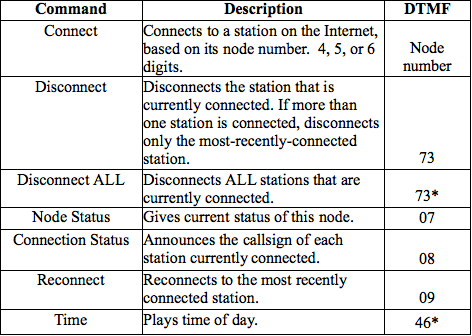
If EchoLink is NOT CONNECTED, your choice would be to connect to a station using it's node number or key in one of the codes in the table below to play one of the information messages. Node numbers for all stations currently connected to the Echolink system can be seen at http://www.echolink.org/logins.jsp .
EchoLink will respond with one of the following messages: "CONNECTING TO XXXXX" or you may get the response "XXXXX NOT FOUND."
If you got the "CONNECTING TO...." message, wait until you hear "CONNECTED TO XXXXX" and then give a short call. If you got the "NOT FOUND" the station is not currently logged into the EchoLink server.
On occasion the connection is actually made but not announced. If you get "CONNECTING TO XXXXX" followed by silence, enter DTMF digits 08 to get the status of the connection.
If you successfully connected to a station, when you are finished with your QSO, key in the DTMF 73 to disconnect.
W9RCA EchoLink DTMF Control Codes:
Current weather conditions, watches and warnings are no longer available. Sorry!
Updated 06-Nov-2020 by AF9A